
Browser extension for Chrome and Firefox
Is it down, or just me? Ask from the page that will not load. The free IsItDown.now extension works in Chrome, Edge, Brave and Firefox: when a site fails to load, it puts a red ? on its icon and offers to check whether the site is down for everyone, and one click opens the live answer. It cannot see the pages you visit and sends nothing anywhere unless you click it.
Version 1.1.0 · Manifest V3 · free, with no account needed
What it does
- When a page fails to load because of a real network error, such as a domain that does not resolve, a refused connection, a timeout or a broken certificate, the icon gets a red ? for that tab and a notification asks “Can't reach example.com?” Click it and isitdown.now/status/example.com opens with a live check from our servers.
- On any page, click the icon and press “Is example.com down?” to check the site you are on, or type any other domain.
- It stays quiet when a load fails for reasons that say nothing about the site: you pressed stop, the link was a download, an ad blocker or your administrator blocked it, or your own connection is offline. It also ignores localhost, IP addresses and private-network names, and shows at most one notification a minute for the same site.
Installing it
The extension is not in the Chrome Web Store or on Firefox Add-ons yet, so you install it from the file you download instead of with a store button. It takes about a minute. Most people get stuck on the first step.
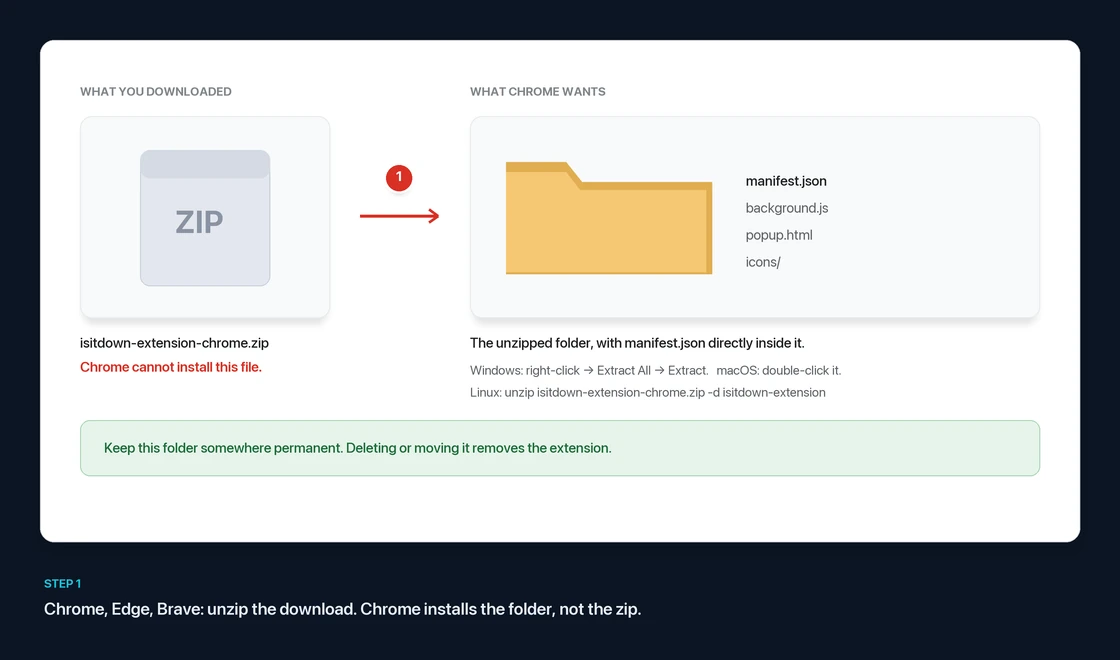
For Chrome, Edge and Brave, unzip it first. The download is a .zip file, and Chrome cannot install a zip. It needs the folder that is inside it. If you choose the zip, nothing happens and no error tells you why.
- Windows: right-click the file, choose Extract All…, then Extract. Do not just double-click it: Windows shows what is in a zip in a normal-looking window without unpacking it, and the browser cannot read files from there.
- macOS: double-click the file. A folder with the same name appears next to it.
- Linux:
unzip isitdown-extension-chrome.zip -d isitdown-extension
You should end up with a folder that has manifest.json, background.js, popup.html and an icons folder directly inside it. Keep it somewhere permanent, such as your Documents folder. If you delete or move it, the extension stops working.
Chrome, Edge, Brave and other Chromium browsers
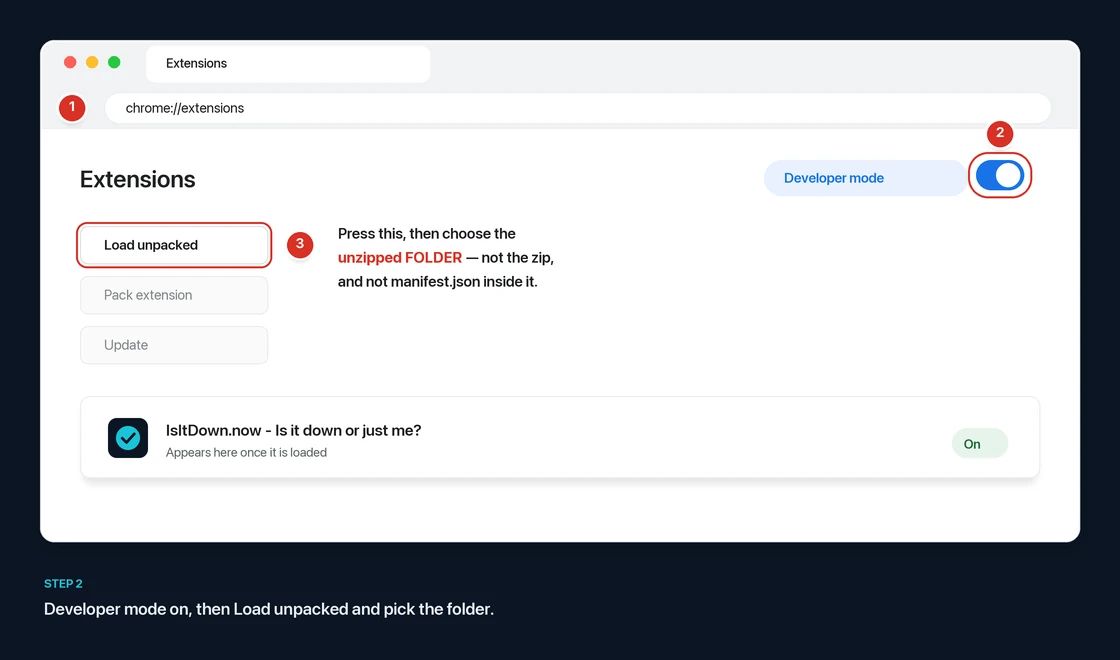
- Download the Chrome package and unzip it as shown above.
- Open
chrome://extensions. In Edge it isedge://extensions, in Bravebrave://extensions, in Operaopera://extensions. Type the address into the address bar: menu locations change from one version to the next. - Turn on Developer mode. It is a switch at the top right in Chrome and Brave, and in the left-hand sidebar in Edge.
- Click Load unpacked and choose the unzipped folder: not the zip, and not
manifest.json, but the folder that contains it. - Pin the icon: click the puzzle-piece icon in the toolbar, then the pin next to IsItDown.now.
Chrome shows Load unpacked only while Developer mode is on, and may remind you about developer-mode extensions when it starts. That is normal for any extension installed this way.
Firefox 140 or newer
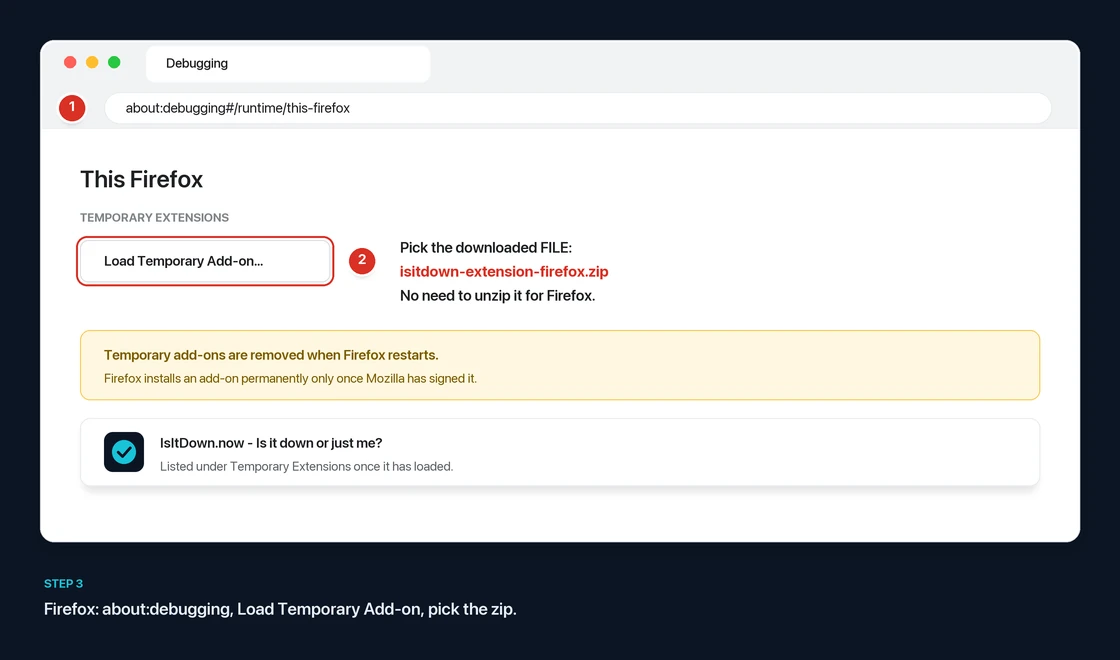
- Download the Firefox package. You do not need to unzip it. It is built from the same source as the Chrome one; only the manifest differs, because Chrome and Firefox each reject keys the other one needs.
- Open
about:debugging#/runtime/this-firefoxby typing it into the address bar. - Click Load Temporary Add-on… and choose the downloaded
isitdown-extension-firefox.zip. If you did unzip it, choosemanifest.jsoninside the folder instead. - Pin the icon: click the puzzle-piece icon in the toolbar, then the gear next to IsItDown.now, and choose Pin to Toolbar.
Firefox removes temporary add-ons when it restarts, so load it again after a restart. We did not choose that: Firefox installs an add-on permanently only after Mozilla has signed it. Until our signed version is published, Firefox Developer Edition and Nightly let you turn off xpinstall.signatures.required in about:config and keep it installed.
Check that it works
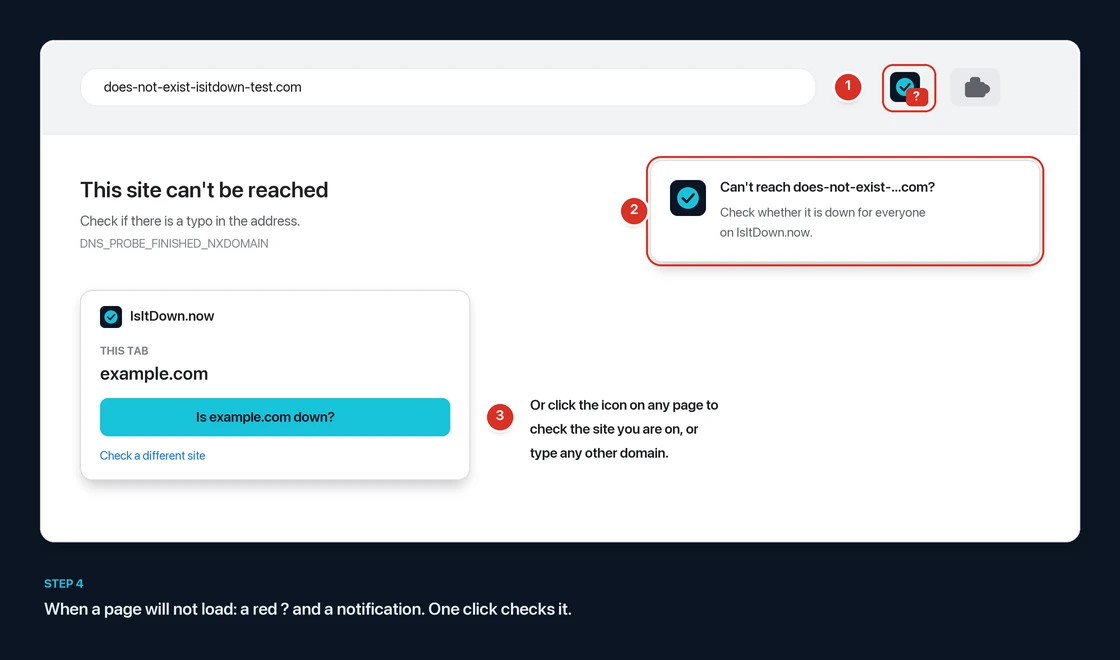
Visit an address that cannot exist, such as https://does-not-exist-isitdown-test.com. The browser shows its own “can't reach this site” page, the IsItDown.now icon gets a red ?, and a notification offers the check. If no notification appears, check that notifications are allowed for your browser in your operating system's settings. The ? on the icon works without them.
If it did not work
| What you see | What it means |
|---|---|
| Nothing happens when you choose the file in Chrome | You chose the zip. Unzip it and choose the folder. |
| “Manifest file is missing or unreadable” | The folder you chose is one level too high or too low. Choose the folder that has manifest.json directly inside it. |
| No “Load unpacked” button | Developer mode is still off. |
| The icon disappeared after a restart | In Firefox, temporary add-ons are removed on restart. In Chrome, the folder was moved or deleted. |
| A red ? but no notification | Notifications for the browser are turned off in your operating system's settings. The popup still works. |
What it can and cannot see
An extension that watches your page loads should get some suspicion, so here is exactly what this one does, and how you can check.
- It cannot read pages. It has no content scripts and no host permissions, so it has no way to see what is on a page, what you type, or your cookies.
- It sends nothing. The extension makes no network requests of its own: no analytics, no crash reports, no update checks, no account. The only thing it ever does outside your browser is open an isitdown.now/status/… tab, and only when you click.
- It cannot change after you install it. There is no remote code, no
evaland no script loaded from a server. Everything it runs is in the zip, and Manifest V3 does not allow extensions to load more. - It stores nothing. It has no storage permission. The one-a-minute notification limit is kept in memory and cleared when the browser puts the extension to sleep.
Permissions it asks for, and why
| Permission | Used for |
|---|---|
| webNavigation | Being told that a page load in a tab failed or finished, and the error code. Nothing about the page's content. |
| tabs | Reading the current tab's address so the popup can offer to check that site, and opening the status page in a new tab. |
| notifications | The “Can't reach example.com?” notification. |
Check the download yourself
- Compare the checksum. Run
shasum -a 256 <file>on macOS or Linux, orcertutil -hashfile <file> SHA256on Windows, and compare the result with the checksums on this page. - Read it. The whole extension is four short files of plain JavaScript and HTML, about 250 lines in total. That is small enough to read in one sitting.
- Watch it. Open your browser's network panel for the extension (Inspect views on its card in
chrome://extensions, or Inspect inabout:debugging). You will not see it make any requests.
It is not signed by Google or Mozilla yet, because it has not been through their review. We would rather say that plainly than suggest a review has happened when it has not.